Start with one small, measurable promise
Open Campaign Studio alongside this guide. It is a planning, creative, and manual results workspace. It does not automatically run ads or collect your analytics. Our fictional example is a tutoring consultation; none of its numbers are real business results. Choose one customer, one offer, one channel, and one primary action before you write copy.
1. Fill in your brand kit
| Brand kit field | What it means and what to enter |
|---|---|
| Saved brand profiles / Create a new brand | Select an existing profile to reuse it, or start a separate profile for a different business. Save brand profile keeps this foundation available; New brand starts another profile. |
| Brand / business name | Your actual public name. Example: a fictional tutoring service called Bright Start. |
| Website (optional) | Your main business URL. This is different from the campaign destination. |
| Link to a saved Website Traffic site (optional) | Associate an existing site in your signed-in account; leave unlinked if you do not have one. |
| Who is your best-fit customer? | A specific person, situation, and need: parents of third graders who need weekday reading support. |
| Core promise / value proposition | The useful result and why the offer fits: a clear reading practice plan with a tutor. A promise needs supporting facts. |
| Verified facts we may mention | Real credentials, included deliverables, service area, or documented evidence. An empty proof field is better than invented testimonials. |
| Claims or phrases to avoid | Unsupported guarantees, unverified outcomes, sensitive assumptions, and language your brand does not use. |
| Voice and tone | Choose warm and clear, confident and direct, playful and friendly, calm and professional, or premium and minimal. This guides wording, not accuracy. |
| Primary / Accent brand colors | Primary anchors the design; accent highlights a detail or action. Check text contrast in the exported image, including on a phone. |
A useful customer description lets you reject an unsuitable idea. “Everyone who wants to learn” does not help. “Parents arranging after-school reading help for a third grader” helps you choose language, a useful resource, and a next step. Save the profile once the core facts are correct.
2. Write the campaign brief
| Campaign brief field | How to fill it in |
|---|---|
| Saved campaigns / New campaign | Reuse a saved experiment or create a distinct record for a new objective, offer, or channel. |
| Campaign name | Use a recognizable label, such as reading-consult-october-linkedin. It also becomes the campaign tag in the tracked link. |
| Channel | The actual distribution destination: Instagram, Facebook, TikTok, LinkedIn, Google Search Ads, YouTube, Pinterest, Email, or Communities / partnerships. |
| Primary goal | Choose Qualified visitors, Email subscribers, Qualified leads, or Sales. Define what counts before publishing. A subscriber is not automatically a qualified lead. |
| Optional test budget (USD) | Your planned media budget, not permission to spend and not actual cost. Enter actual cost later. |
| Problem you are helping solve | Describe the customer difficulty in their language, not your product feature list. |
| Offer / what happens next | The concrete exchange: book a 15-minute reading consultation, download a practice sheet, or buy a session. |
| Landing page URL | The exact page that fulfils the ad promise. Test it, the form, and the confirmation on mobile. |
For our example, choose qualified leads, a consultation landing page, and a $120 test budget if that is an affordable amount to lose. Define a qualified lead as a parent in the service area requesting the offered support. If you do not know whether someone meets those criteria, keep the record unqualified until reviewed.
3. Make three ideas worth comparing
| Creative studio term or control | Meaning and practical use |
|---|---|
| Draft 3 messaging angles | Creates editable starting points: Relatable problem, Clear benefit, and Helpful resource. An angle is a reason to care, not a different audience. |
| Generate three angles with AI | Optional AI drafting needs an eligible account and connected provider. Review what is sent and every returned claim; availability can change. |
| Preflight review | Copy checks that flag possible issues. Passing is not proof that claims are true, the platform will approve an ad, or the campaign will work. |
| Opening hook / Headline | The hook earns initial attention; the headline states the core idea. Keep both specific and consistent with the destination. |
| Caption / primary text | The supporting explanation, evidence, and context around the main idea. |
| Call to action (CTA) | One clear next action, such as See the practice plan or Book a consultation. |
| Visual template | Editorial gradient, Calm minimal, or Split spotlight controls layout. It is not a placement recommendation. |
| Creative size | Square 1080 × 1080; Story 1080 × 1920; Landscape 1200 × 628. Check the current placement requirements and text-safe areas in the receiving platform. |
| Optional product / brand photo | Use an image you have rights to use. Current upload limit is 8 MB; the photo preview stays local and is not saved to the cloud. |
| Export editable creative PNG | The label exports a PNG: a flattened image. Edit source text in the studio and export again; the PNG itself is not a layered editable document. |
| Copy ad caption / Copy AI creative brief / Open ChatGPT | Copy text for manual use or open another tool. Opening ChatGPT does not publish an ad. |
| Save campaign & creatives | Save the working record before entering performance. This does not launch or purchase advertising. |
Write one problem angle about knowing what to practise, one benefit angle about a clear weekly plan, and one resource angle offering a reading checklist. Keep the offer and intended customer consistent. Changing the audience, offer, format, and headline simultaneously makes the cause of a difference hard to interpret.
4. Build the tracked link
UTM means Urchin Tracking Module; these are labels added to a URL. utm_source identifies the referrer, utm_medium the channel type, utm_campaign the named experiment, and utm_content the creative version. The Creative label field supplies that last value. Use lowercase, stable names and no personal information.
Current studio behavior: Google Search uses cpc; Email uses email; Communities / partnerships uses referral. Other channel options use paid_social when the planned budget is positive and organic_social otherwise. Inspect the generated URL and adjust tags in your publishing workflow when that classification does not fit, especially YouTube or a non-media budget. Tags do not install analytics. Test the destination and confirm collection in your analytics setup.
5. Enter real results once
| Results field | Definition and source |
|---|---|
| Reporting date | A date for this entry. Record the covered period and timezone in the notes. Use non-overlapping daily entries, or one consistently defined reporting interval. |
| Creative angle | The exact problem, benefit, or resource version that generated these results. Separate angle rows if you have that evidence. |
| Spend ($) | Actual media cost from the ad platform for this interval. Budget is not spend. Keep production costs separately. |
| Impressions | Times the ad was displayed, from the publishing platform. This is not unique people reached. |
| Clicks | Comparable destination/link clicks from the platform. Do not quietly substitute all interactions, profile taps, or video plays. |
| Website visits | Choose GA4 sessions for the matching tagged campaign and period, and document that choice. Sessions, users, and clicks are different units. |
| Qualified leads | Deduplicated inquiries that meet written fit criteria, checked in your CRM or lead record. A form submit alone may not qualify. |
| Sales | Completed orders or deals using one consistent definition. Keep test transactions out and account for cancellations. |
| Revenue ($) | Sales value attributable under your stated reporting method. Document refunds, taxes, currency, and attribution window consistently. |
| What did you learn? | Record period, sources, lead definition, changes, unknowns, and the next decision. Do not write “winner” from one sale. |
Save campaign & creatives first, then record actual performance. Blank means unknown; enter 0 only when you measured zero. The studio adds rows together: entering Monday’s cumulative total and then Tuesday’s cumulative total double-counts Monday. Missing values are excluded separately from each total, so ratios can also be misleading when spend and leads cover different dates. Complete comparable rows or reconcile the CSV before using a ratio.
6. Understand the answers
| Calculated result | Formula | Illustrative answer |
|---|---|---|
| Website visits / Qualified leads | Sum of the recorded values | 150 visits / 6 leads |
| Lead rate | Qualified leads ÷ website visits × 100 | 6 ÷ 150 × 100 = 4% |
| Cost / lead | Spend ÷ qualified leads | $120 ÷ 6 = $20 |
| CTR: click-through rate | Clicks ÷ impressions × 100 | 180 ÷ 12,000 × 100 = 1.5% |
| ROAS: return on ad spend | Attributed revenue ÷ media spend | $240 ÷ $120 = 2×; not profit |
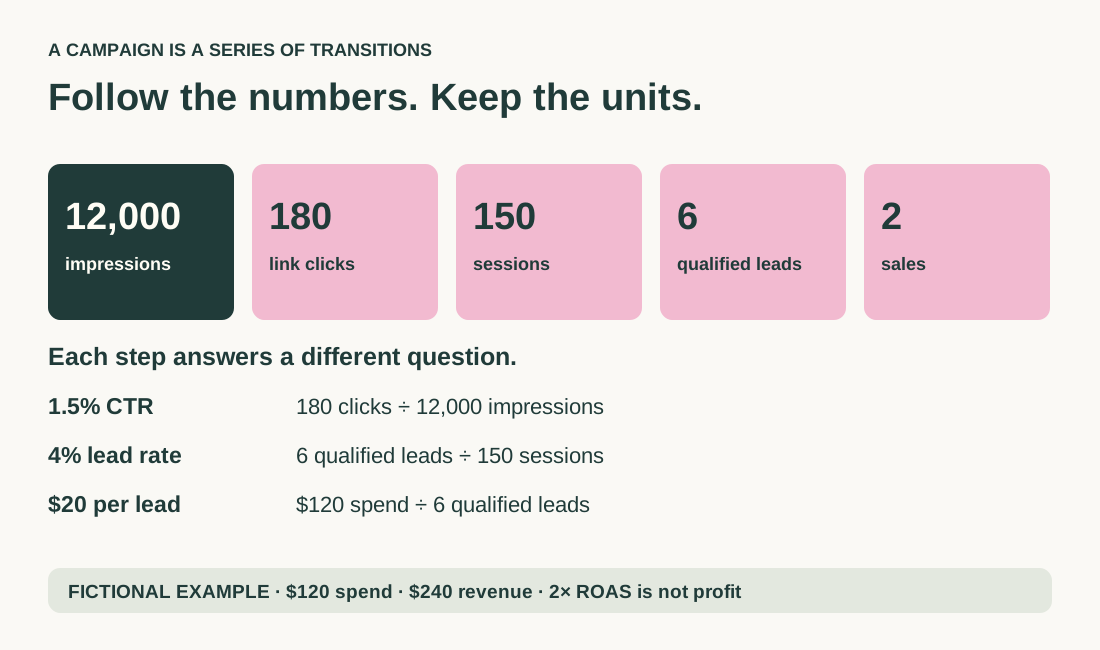
A 1.5% CTR says how frequently an impression became a click. It cannot tell you whether people were a good fit. A 4% lead rate describes the transition from recorded visits to qualified inquiries. Two sales at $120 each give $240 revenue and 2× ROAS; subtract delivery costs, refunds, fees, and acquisition costs before discussing profit. If a denominator is zero or unavailable, the studio shows a dash rather than a meaningful rate. There is no universal “good” value. Compare with your economics and your own comparable campaigns.
Save your learning, not just your artwork
Creative comparison displays recorded observations, not statistical proof. If one angle has two leads and another one, investigate the conversations before increasing budget. Export CSV retains the metrics but the current export does not include the creative-angle field; preserve angle details in your notes or the campaign record. The JSON brief includes the campaign and its measurement records, including angle identifiers; retain it alongside the CSV. It is not a live reporting dashboard.
Guest drafts live in this browser. Optional cloud saving requires sign-in; existing guest work is not uploaded automatically. A local photo does not travel with cloud data. Keep an export before switching devices. For email-subscriber goals there is no separate subscriber result field in this version: track confirmed opt-ins separately instead of relabeling them qualified leads. Your first review should end with one action: fix measurement, improve the destination, refine the offer, or continue a bounded test.
Sources and further reading
Primary references checked October 11, 2026. Exercises, frameworks, and fictional examples are our teaching material; forecasts are labelled as scenarios.
Keep exploring
How to read analytics reports: a visual walkthrough for beginners
Marketing KPIs explained: traffic, PPC, conversion, and customer growth